Best Fully SplitKinesis
Kinesis Freestyle2 Blue for PC (9 Inch Separation)
In: Best Ergonomic Keyboards for Programmers
- Fully split halves connected by pivot tether, 0 to 9 inches of separation
- Standard QWERTY stagger, no columnar relearning
Ergonomic keyboards aim to keep your wrists straighter. The best design depends on how much of a learning curve you'll accept.
Standout picks from our best-of lists. Tap any product for features, pros and cons.
In: Best Ergonomic Keyboards for Programmers
In: Best Ergonomic Keyboards Under $100
In: Best Ergonomic Keyboards 2026
In: Best Ergonomic Keyboards Under $100
In: Best Ergonomic Keyboards for Programmers
In: Best Ergonomic Keyboards for Programmers
In: Best Ergonomic Keyboards for Programmers
In: Best Ergonomic Keyboards Under $100
Ranked shortlists for specific budgets and use cases. Start with the one that matches yours.
Curved one-piece keyboards are the easiest switch from a standard keyboard. Fully split keyboards let you position each half at shoulder width, and tenting raises the middle to reduce forearm twist. Column-staggered layouts go further but take weeks to learn.
Try changing one thing at a time so typing speed recovers quickly.
One-piece curved boards are easy to adopt. Fully split designs offer the most adjustability.
Adjustable tenting and negative tilt help keep wrists neutral.
Standard staggered layouts are familiar. Column-staggered and ortholinear layouts require relearning.
Mechanical switches offer consistent feel; membrane keyboards are quieter.
Wireless reduces cable clutter. Check battery life and compatibility.
Research-based picks from specs, independent reviews and owner feedback.
No paid placements, ever.
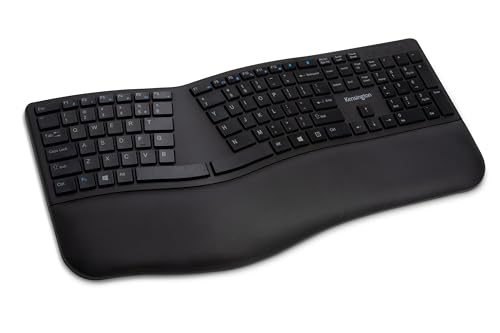
Our methodologyOne of our strongest picks is the Kinesis Freestyle2 Blue for PC (9 Inch Separation), a standout in our Best Ergonomic Keyboards for Programmers list. The Logitech Ergo K860 Wireless Ergonomic Split Keyboard is another excellent choice.
Start with your main use and budget, then compare our shortlists: Best Ergonomic Keyboards for Programmers, Best Ergonomic Keyboards Under $100, Best Ergonomic Keyboards 2026.
One-piece curved boards are easy to adopt. Fully split designs offer the most adjustability.
Not necessarily, but programmers benefit more from split layouts than most users because they type more hours per day and reach for symbols and modifier keys more frequently. A fixed-split keyboard like the Logitech K860 reduces ulnar deviation without requiring separate positioning of two halves. A fully split keyboard like the Kinesis Freestyle2 allows shoulder-width positioning that also addresses shoulder strain, which is the next most common complaint after wrist pain in programmers who type 8+ hours daily. Try a fixed split first; if shoulder and upper back strain persists, upgrade to fully split.
Mechanical switches provide tactile feedback and consistent actuation that reduce the force needed per keystroke over a full day. Over 8 hours of coding, the lower force requirement of a light tactile switch reduces hand fatigue measurably. However, most ergonomic keyboards under 150 dollars use membrane switches, and the ergonomic layout benefit outweighs the switch type. If budget allows, a mechanical split like the Kinesis Advantage2 combines both benefits. If budget is tight, prioritize the split layout over the switch type.
Compact layouts without a number pad bring the mouse closer to the centerline, which reduces the reaching motion that contributes to shoulder strain. For programmers who rarely use a number pad, a tenkeyless or 65 percent ergonomic layout is ideal. The downside is that compact layouts often relocate function keys, navigation clusters, and arrow keys behind layers, which can slow down editing workflows that rely on those keys. If you use Home, End, Page Up, and Page Down frequently while editing, a full-size ergonomic keyboard keeps those keys accessible.
Three adjustments matter most. First, position the keyboard so your elbows are at 90 degrees and your wrists float above the keys in a neutral position without bending up or down. Second, if the keyboard has tenting legs, use them to angle the inner edge up, reducing wrist pronation. Third, remap keys to reduce pinky strain: swap Caps Lock with Ctrl (the most common ergonomic remap in the programming community), map Escape to a thumb key if available, and consider a compose key for frequently used symbol combinations. The physical layout changes your wrist angle; the key remapping changes your finger strain distribution.
The K860 typically sells between 100 and 130 dollars, but drops below 100 during sales several times a year and is the best ergonomic keyboard you can buy near that price. The curved split design, integrated palm rest, and adjustable tenting address wrist pronation and ulnar deviation simultaneously, which is the combination that reduces strain most effectively. If it is at its regular price, it is still worth the premium over cheaper options because nothing else under 150 combines these three features as well.