OREI
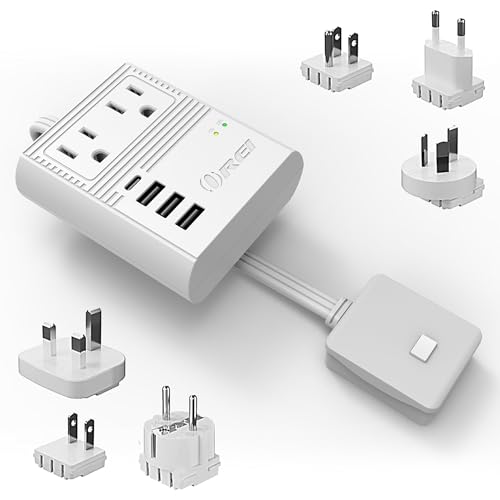
OREI World Travel Plug Adapter
- Slide-out plug attachments including Type C/E/F and Type G
- 2 USB-A ports plus 1 universal AC outlet
If your laptop won't charge through a travel adapter, the cause is usually one of a few common issues: trying to charge through a low-wattage USB-C port, an ungrounded outlet, or an overloaded adapter
Work through these in order, the most common causes come first.
USB-C port wattage: most travel adapter USB-C ports are rated 18 to 20W. Most laptops need 45 to 100W. Charging directly through the adapter's USB-C port is rarely the right approach.
Laptop won't charge at all, plugged into the adapter's USB-C port: expected in most cases. Switch to the adapter's AC outlet with your laptop's own brick. Laptop charges very slowly through the AC outlet: check the adapter's total wattage rating against your laptop charger's rated wattage, and reduce other devices drawing power simultaneously.
Best Travel Adapters for Laptops, laptop-specific product picks Travel Adapter Overheating, a related safety issue Travel Adapters Buying Guide, wattage and grounding reference
USB-C port wattage: most travel adapter USB-C ports are rated 18 to 20W.
Most laptops need 45 to 100W.
Charging directly through the adapter's USB-C port is rarely the right approach.
Grounded vs ungrounded outlets: a 3-prong grounded laptop charger may not work correctly, or at all, on an adapter that only supports 2-prong ungrounded connections.
Shared wattage capacity: if several other devices are drawing power from the same adapter, the laptop may not get enough to charge properly.
Laptop won't charge at all, plugged into the adapter's USB-C port: expected in most cases.
Switch to the adapter's AC outlet with your laptop's own brick.
Laptop charges very slowly through the AC outlet: check the adapter's total wattage rating against your laptop charger's rated wattage, and reduce other devices drawing power simultaneously.
Laptop charger won't seat properly in the adapter's outlet: likely a grounding mismatch.
Confirm your charger's plug style (2-prong or 3-prong) against the adapter's outlet design.
Best Travel Adapters for Laptops, laptop-specific product picks Travel Adapter Overheating, a related safety issue Travel Adapters Buying Guide, wattage and grounding reference How to Choose a Travel Adapter, avoiding mismatches before you travel
Most travel adapter USB-C ports are rated 18 to 20W, far below the 45 to 100W most laptops need for charging. Some laptops won't charge at all below a minimum wattage threshold, and others will charge extremely slowly or not keep pace with active use. Use the adapter's AC outlet with your laptop's own charging brick instead of its USB-C port.
Always the AC outlet, using your laptop's own charging brick, unless you've specifically verified the adapter's USB-C port matches or exceeds your laptop's required wattage, which is rare for typical travel adapters. The AC outlet approach works exactly like charging at home, just with a plug shape adapter in between.
Some laptop chargers use a grounded 3-prong plug and may not seat properly, or may trigger a safety cutoff, on an adapter that only supports 2-prong ungrounded connections. If your laptop brick has a 3-prong plug, confirm your adapter's outlet is a full grounded 3-prong design, not a 2-prong-only adapter.
If several other devices are drawing power from the same adapter's shared wattage capacity, the laptop, often the highest-draw device on the adapter, may not receive enough power to charge, or may charge very slowly. Unplug other devices and test the laptop alone to isolate this.