
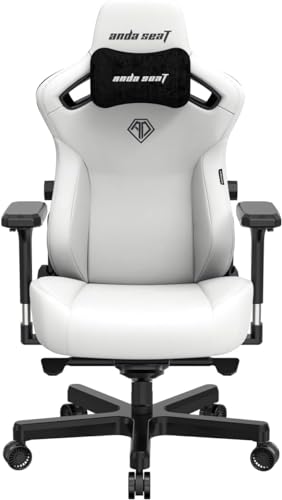


Best OverallAndaSeat
AndaSeat Kaiser 3 Large Gaming Chair
In: Best Gaming Chairs for Back Pain
- Integrated lumbar adjusts both height and extension depth
- Cold-cure foam seat and backrest
The best gaming chair fits your body and supports long sessions. Adjustability and seat size matter more than looks.
Standout picks from our best-of lists. Tap any product for features, pros and cons.
In: Best Gaming Chairs for Back Pain
In: Best Gaming Chairs Under $300
In: Best Gaming Chairs 2026
In: Best Gaming Chairs for Back Pain
In: Best Gaming Chairs Under $300
In: Best Gaming Chairs Under $300
In: Best Gaming Chairs Under $300
In: Best Gaming Chairs for Back Pain
Ranked shortlists for specific budgets and use cases. Start with the one that matches yours.
Racing-style gaming chairs look striking, but many have narrow seats and bolsters that don't suit every body. Size charts are worth checking closely. Office-style ergonomic chairs can be more comfortable for long sessions and are worth considering.
Adjustable armrests, seat height and lumbar support make a bigger difference than recline angle.
Check height and weight ranges. Wider seats suit larger users.
Built-in adjustable lumbar is better than loose pillows.
3D or 4D armrests position your arms at desk height.
PU leather is easy to clean but warm. Fabric and mesh breathe better.
Look for long frame and gas lift warranties.
Research-based picks from specs, independent reviews and owner feedback.
No paid placements, ever.
Our methodologyOne of our strongest picks is the AndaSeat Kaiser 3 Large Gaming Chair, a standout in our Best Gaming Chairs for Back Pain list. The DXRacer Formula Series Gaming Chair is another excellent choice.
Start with your main use and budget, then compare our shortlists: Best Gaming Chairs for Back Pain, Best Gaming Chairs Under $300, Best Gaming Chairs 2026.
Check height and weight ranges. Wider seats suit larger users.
Premium gaming chairs with integrated adjustable lumbar systems genuinely help with lower back pain from sitting. Budget gaming chairs with foam pillow inserts provide inconsistent results because the pillow migrates during use and sits at the wrong height for many users. The key differentiator is the lumbar system: integrated and adjustable (AndaSeat Kaiser 3, noblechairs EPIC) works; detachable pillow insert is marginally better than nothing. If back pain is severe or originates from a medical condition rather than posture, a gaming chair is not a substitute for medical evaluation.
A good ergonomic office chair (Herman Miller Aeron, Steelcase Leap, Humanscale Freedom) addresses back pain more systematically than any gaming chair. These chairs have adjustable lumbar in multiple axes, seat depth adjustment, synchronized recline that follows the body, and years of ergonomic research behind them. A premium gaming chair like the AndaSeat Kaiser 3 is competitive with mid-range office chairs (Steelcase Series 1, Branch Ergonomic Chair) but is not comparable to top-tier ergonomic seating. If back pain is the primary concern and budget is not, an ergonomic office chair is the more appropriate investment.
Set the chair height so your feet are flat on the floor with your thighs parallel to the ground. This distributes body weight evenly across the seat and keeps the pelvis in a neutral tilt, which is the foundation of correct lumbar positioning. From there, adjust the lumbar support so the curve contacts your lower back at the natural concave curve of the lumbar spine, typically 2 to 4 inches above the seat. If your feet dangle, use a footrest rather than lowering the chair, which would force you to slouch to reach the desk.
First, a chair that is too low forces the pelvis to tilt backward (posterior tilt), flattening the lumbar curve and straining the lower back muscles and discs over time. Second, a chair with no lumbar support or a lumbar that does not match the user's spinal curve leaves the lower back muscles actively working to maintain sitting posture rather than being supported. Over an 8-hour session, this muscle fatigue manifests as lower back pain. The fix is correct seat height and effective lumbar support, not just any gaming chair.
For occasional gaming sessions of 1 to 4 hours: yes. For 6 to 8 hours of daily seating: no. The foam in budget gaming chairs compresses noticeably after 3 to 6 months, and the lumbar support is almost always a pillow insert that migrates rather than an integrated adjustable system.


